
Instructional video:
Enable Customer Authorization Tracking from Feature Configuration before publishing estimates for approval.
Before You Begin
- Your shop must have an active Pro or Elite plan.
- You must have access to the shop’s Account Billing page.
Enable Customer Authorization
- Log in to app.hibbittsautopro.com.
- Open My Profile from the left menu.
- Select Account Billing.
- Scroll to Feature Configuration.
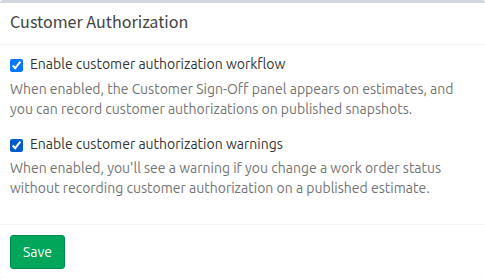
- Under Customer Authorization, select Enable customer authorization workflow.
- Optionally select Enable customer authorization warnings.
- Select Save.
How the Settings Work
- Customer authorization workflow displays Customer Sign-Off after an estimate has been published and allows authorization to be recorded against that version.
- Customer authorization warnings displays a reminder when a work-order status is changed without authorization on the current published estimate.
- Warnings are informational. They do not prevent the status change.
What Happens Next
Open a work order and use Preview Estimate or Email Estimate to publish the first estimate version. Customer Sign-Off appears after a published estimate is available.