
Instructional video:
Use Customer Sign-Off to review published estimate versions, inspect authorization details, and record approval received by phone, in writing, or through another channel.
Review Estimate Versions
- Open the customer’s work order.
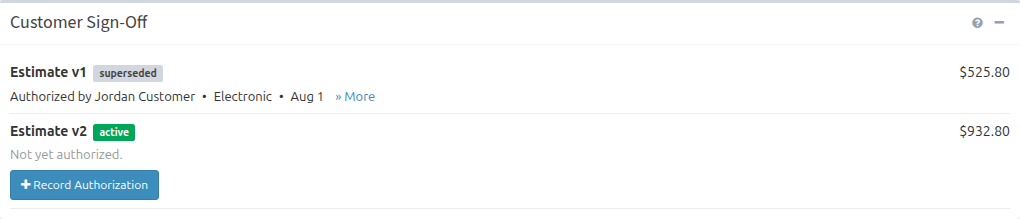
- Find Customer Sign-Off.
- Review the version number, status, and total for each published estimate.
- For an authorized version, review who authorized it, the authorization method, and the date.
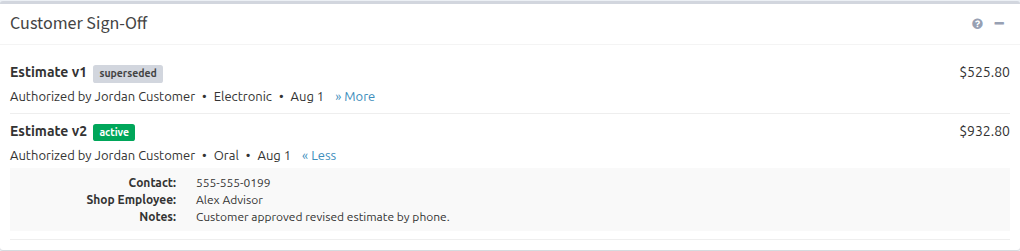
- Select More to display available contact, employee, notes, IP, or signature details.
Record Authorization Received by Your Shop
- Find the active estimate marked Not yet authorized.
- Select Record Authorization.
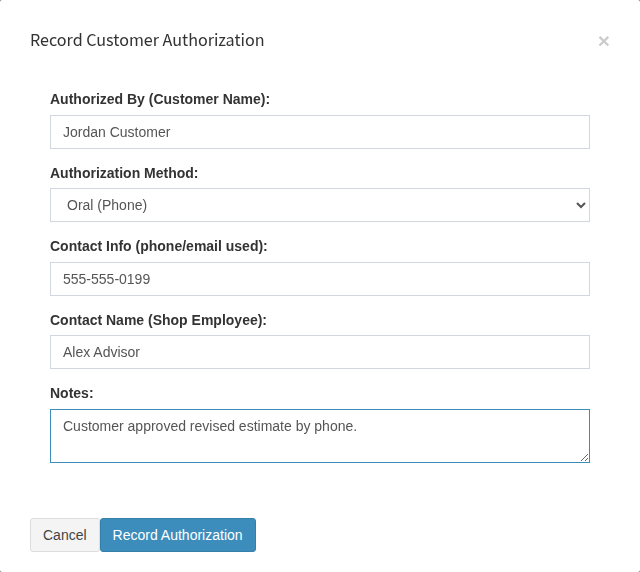
- Enter the customer’s name.
- Choose Written, Electronic, or Oral as the authorization method.
- Add the phone number or email used, the shop employee involved, and useful notes.
- Select Record Authorization.
Select More after saving to review the additional authorization details.
Publish a Revised Estimate
If the work changes or additional service is added, update the work order and publish another estimate with Preview Estimate or Email Estimate. The previous version becomes superseded, and the new version becomes active. Obtain customer authorization for the new active version before relying on it as the current approval.
Authorization Warnings
If your shop enabled customer authorization warnings, changing a work-order status without authorization on the current published estimate can display this reminder:

Important Notes
- Customer authorization is recorded against a specific published estimate version.
- Publishing a revised estimate does not transfer authorization from the earlier version.
- Choosing Written records that written authorization was received; the staff form does not upload a signature.
- Refresh the work order to display authorization completed in another browser or device.